Memory Benchmarks
This document describes benchmarks available to track Chrome‘s and WebView’s memory usage, where they live, what they measure, how to run them, and on how to diagnose regressions.
Glossary
- User story: a set of actions to perform on a browser or device (e.g. open google homepage, type “foo”, click search, scroll down, visit first result, etc.).
- Metric: a data aggregation process that takes a Chrome trace as input (produced by a Telemetry run) and produces a set of summary numbers as output (e.g. total GPU memory used).
- Benchmark: a combination of (one or more) user stories and (one or more) metrics.
System Health
System health is an effort to unify top-level benchmarks (as opposite to micro-benchmarks and regression tests) that are suitable to capture representative user stories.
Benchmarks
System health memory benchmarks are:
- system_health.memory_mobile - user stories running on Android devices.
- system_health.memory_desktop - user stories running on desktop platforms.
These benchmarks are run continuously on the chromium.perf waterfall, collecting and reporting results on the Chrome Performance Dashboard.
Other benchmarks maintained by the memory-infra team are discussed in the appendix.
User stories
System health user stories are classified by the kind of interactions they perform with the browser:
browsestories navigate to a URL and interact with the page; e.g. scroll, click on elements, navigate to subpages, navigate back.loadstories just navigate to a URL and wait for the page to load.backgroundstories navigate to a URL, possibly interact with the page, and then bring another app to the foreground (thus pushing the browser to the background).long_runningstories interact with a page for a longer period of time (~5 mins).blankhas a single story that just navigates to about:blank.
The full name of a story has the form {interaction}:{category}:{site} where:
interactionis one the labels given above;categoryis used to group together sites with a similar purpose, e.g.news,social,tools;siteis a short name identifying the website in which the story mostly takes place, e.g.cnn,facebook,gmail.
For example browse:news:cnn and background:social:facebook are two system health user stories.
Today, for most stories a garbage collection is forced at the end of the story and a memory dump is then triggered. Metrics report the values obtained from this single measurement.
Continuous monitoring
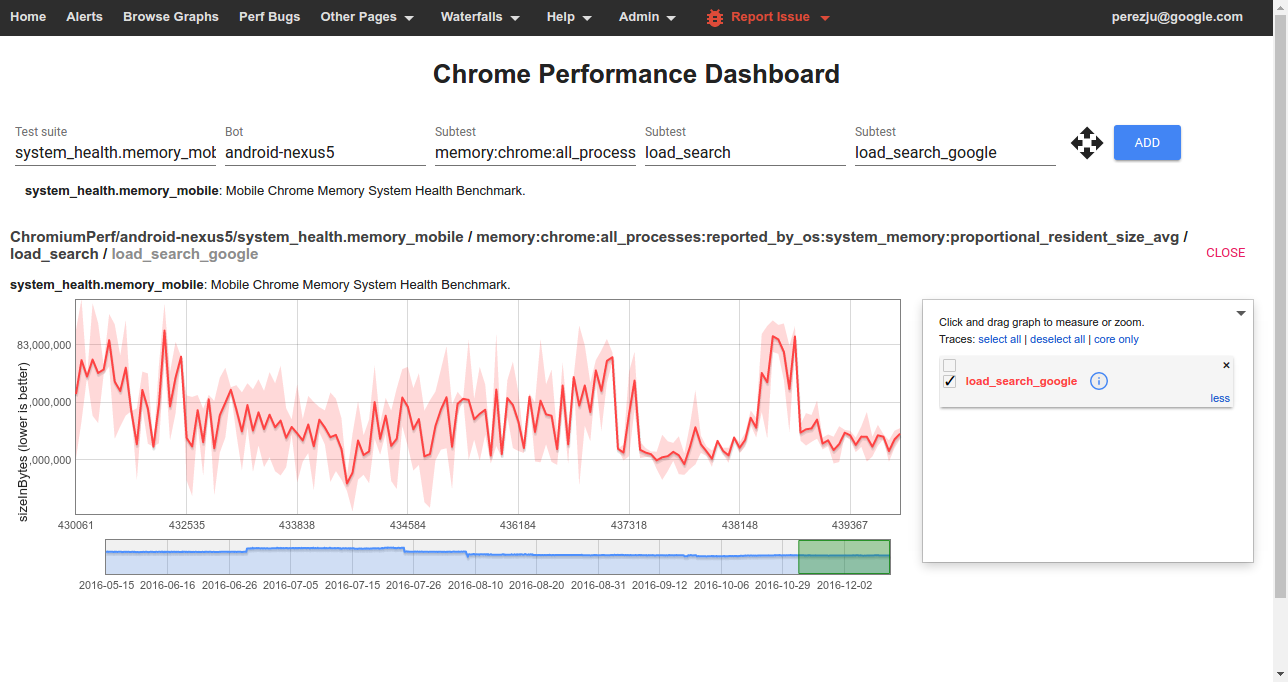
To view data from one of the benchmarks on the Chrome Performance Dashboard you should select:
- Test suite: The name of a benchmark.
- Bot: The name of a platform or device configuration. Sign in to also see internal bots.
- Subtest (1): The name of a metric.
- Subtest (2): The name of a story group; these have the form
{interaction}_{category}for system health stories. - Subtest (3): The name of a user story (with
:replaced by_).
How to run the benchmarks
Benchmarks may be run on a local platform/device or remotely on a try job.
How to run locally
After building, e.g. ChromePublic.apk, you can run a specific system health story with the command:
$SRC/tools/perf/run_benchmark run system_health.memory_mobile \
    --browser android-chromium --story-filter load:search:google
This will run the story with a default of 3 repetitions and produce a results.html file comparing results from this and any previous benchmark runs.
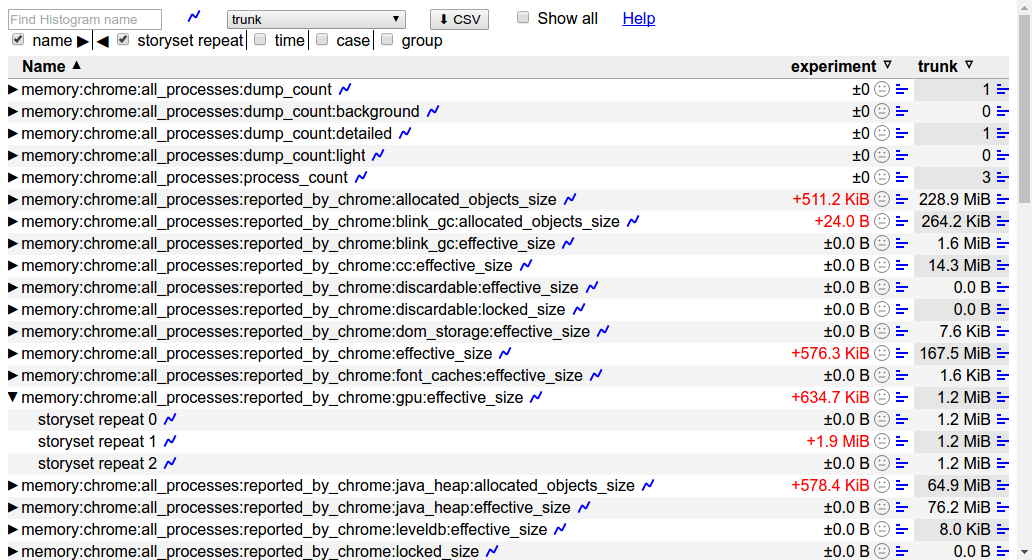
Other useful options for this command are:
--pageset-repeat [n]- override the default number of repetitions--output-format html --output-format json- select both output formats to get individual trace files in addition to theresults.htmlfile.--reset-results- clear results from any previous benchmark runs in theresults.htmlfile.--results-label [label]- give meaningful names to your benchmark runs, this way it is easier to compare them.
For WebView make sure to replace the system WebView on your device and use --browser android-webview.
How to run a try job
Given a patch on a chromium checkout, try jobs provide a convenient way to evaluate its memory implications on devices or platforms which may not be immediately available to developers.
To start a try job upload a CL and run the command, e.g.:
$SRC/tools/perf/run_benchmark try android-nexus5 system_health.memory_mobile
This will run all of the system health stories for you, and conveniently provide a results.html file comparing measurements with/without your patch. Options like --story-filter and --pageset-repeat may also be passed to this command.
To see the full list of available try bots run the command:
$SRC/tools/perf/run_benchmark try list
Understanding memory metrics
There is a large number of memory-infra metrics, breaking down usage attributed to different components and processes.
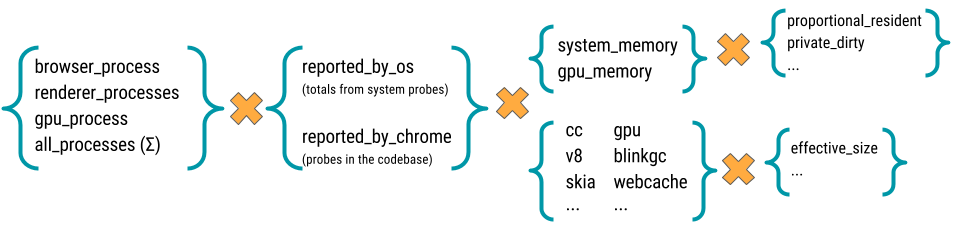
Most memory metrics have the form memory:{browser}:{processes}:{source}:{component}:{kind} where:
- browser: One of
chromeorwebview. - processess: One of
browser_process,renderer_processess,gpu_process, orall_processess. - source: One of
reported_by_chromeorreported_by_os - component: May be a Chrome component, e.g.
skiaorsqlite; details about a specific component, e.g.v8:heap; or a class of memory as seen by the OS, e.g.system_memory:native_heaporgpu_memory. - kind: The kind of memory being reported. For metrics reported by Chrome this usually is
effective_size(others arelocked_sizeandallocated_objects_size); for metrics by the OS this usually isproportional_resident_size(others arepeak_resident_sizeandprivate_dirty_size).
Appendix
Other benchmarks
Other benchmarks maintained by the memory-infra team are:
memory.dual_browser_test - cycle between doing Google searches on a WebView-based browser (a stand-in for the Google Search app) and loading pages on Chrome. Runs on Android devices only.
Story groups are either
on_chromeoron_webview, indicating the browser in foreground at the moment when the memory measurement was made.memory.long_running_dual_browser_test - same as above, but the test is run for 60 iterations keeping both browsers alive for the whole duration of the test and without forcing garbage collection. Intended as a last-resort net to catch memory leaks not apparent on shorter tests.
memory.top_10_mobile - cycle between loading a page on Chrome, pushing the browser to the background, and then back to the foreground. (To be deprecated in favor of system_health.memory_mobile.)
Story groups are either
foregroundorbackgroundindicating the state of the browser at the time of measurement.memory.top_10_mobile_stress - same as above, but keeps a single instance of the browser open for 5 repetitions. (To be deprecated.)