| Command Line Interface for Zstandard library |
| ============================================ |
| |
| Command Line Interface (CLI) can be created using the `make` command without any additional parameters. |
| There are however other Makefile targets that create different variations of CLI: |
| - `zstd` : default CLI supporting gzip-like arguments; includes dictionary builder, benchmark, and supports decompression of legacy zstd formats |
| - `zstd_nolegacy` : Same as `zstd` but without support for legacy zstd formats |
| - `zstd-small` : CLI optimized for minimal size; no dictionary builder, no benchmark, and no support for legacy zstd formats |
| - `zstd-compress` : version of CLI which can only compress into zstd format |
| - `zstd-decompress` : version of CLI which can only decompress zstd format |
| |
| |
| ### Compilation variables |
| `zstd` scope can be altered by modifying the following `make` variables : |
| |
| - __HAVE_THREAD__ : multithreading is automatically enabled when `pthread` is detected. |
| It's possible to disable multithread support, by setting `HAVE_THREAD=0`. |
| Example : `make zstd HAVE_THREAD=0` |
| It's also possible to force multithread support, using `HAVE_THREAD=1`. |
| In which case, linking stage will fail if neither `pthread` nor `windows.h` library can be found. |
| This is useful to ensure this feature is not silently disabled. |
| |
| - __ZSTD_LEGACY_SUPPORT__ : `zstd` can decompress files compressed by older versions of `zstd`. |
| Starting v0.8.0, all versions of `zstd` produce frames compliant with the [specification](../doc/zstd_compression_format.md), and are therefore compatible. |
| But older versions (< v0.8.0) produced different, incompatible, frames. |
| By default, `zstd` supports decoding legacy formats >= v0.4.0 (`ZSTD_LEGACY_SUPPORT=4`). |
| This can be altered by modifying this compilation variable. |
| `ZSTD_LEGACY_SUPPORT=1` means "support all formats >= v0.1.0". |
| `ZSTD_LEGACY_SUPPORT=2` means "support all formats >= v0.2.0", and so on. |
| `ZSTD_LEGACY_SUPPORT=0` means _DO NOT_ support any legacy format. |
| if `ZSTD_LEGACY_SUPPORT >= 8`, it's the same as `0`, since there is no legacy format after `7`. |
| Note : `zstd` only supports decoding older formats, and cannot generate any legacy format. |
| |
| - __HAVE_ZLIB__ : `zstd` can compress and decompress files in `.gz` format. |
| This is ordered through command `--format=gzip`. |
| Alternatively, symlinks named `gzip` or `gunzip` will mimic intended behavior. |
| `.gz` support is automatically enabled when `zlib` library is detected at build time. |
| It's possible to disable `.gz` support, by setting `HAVE_ZLIB=0`. |
| Example : `make zstd HAVE_ZLIB=0` |
| It's also possible to force compilation with zlib support, using `HAVE_ZLIB=1`. |
| In which case, linking stage will fail if `zlib` library cannot be found. |
| This is useful to prevent silent feature disabling. |
| |
| - __HAVE_LZMA__ : `zstd` can compress and decompress files in `.xz` and `.lzma` formats. |
| This is ordered through commands `--format=xz` and `--format=lzma` respectively. |
| Alternatively, symlinks named `xz`, `unxz`, `lzma`, or `unlzma` will mimic intended behavior. |
| `.xz` and `.lzma` support is automatically enabled when `lzma` library is detected at build time. |
| It's possible to disable `.xz` and `.lzma` support, by setting `HAVE_LZMA=0`. |
| Example : `make zstd HAVE_LZMA=0` |
| It's also possible to force compilation with lzma support, using `HAVE_LZMA=1`. |
| In which case, linking stage will fail if `lzma` library cannot be found. |
| This is useful to prevent silent feature disabling. |
| |
| - __HAVE_LZ4__ : `zstd` can compress and decompress files in `.lz4` formats. |
| This is ordered through commands `--format=lz4`. |
| Alternatively, symlinks named `lz4`, or `unlz4` will mimic intended behavior. |
| `.lz4` support is automatically enabled when `lz4` library is detected at build time. |
| It's possible to disable `.lz4` support, by setting `HAVE_LZ4=0` . |
| Example : `make zstd HAVE_LZ4=0` |
| It's also possible to force compilation with lz4 support, using `HAVE_LZ4=1`. |
| In which case, linking stage will fail if `lz4` library cannot be found. |
| This is useful to prevent silent feature disabling. |
| |
| - __ZSTD_NOBENCH__ : `zstd` cli will be compiled without its integrated benchmark module. |
| This can be useful to produce smaller binaries. |
| In this case, the corresponding unit can also be excluded from compilation target. |
| |
| - __ZSTD_NODICT__ : `zstd` cli will be compiled without support for the integrated dictionary builder. |
| This can be useful to produce smaller binaries. |
| In this case, the corresponding unit can also be excluded from compilation target. |
| |
| - __ZSTD_NOCOMPRESS__ : `zstd` cli will be compiled without support for compression. |
| The resulting binary will only be able to decompress files. |
| This can be useful to produce smaller binaries. |
| A corresponding `Makefile` target using this ability is `zstd-decompress`. |
| |
| - __ZSTD_NODECOMPRESS__ : `zstd` cli will be compiled without support for decompression. |
| The resulting binary will only be able to compress files. |
| This can be useful to produce smaller binaries. |
| A corresponding `Makefile` target using this ability is `zstd-compress`. |
| |
| - __BACKTRACE__ : `zstd` can display a stack backtrace when execution |
| generates a runtime exception. By default, this feature may be |
| degraded/disabled on some platforms unless additional compiler directives are |
| applied. When triaging a runtime issue, enabling this feature can provide |
| more context to determine the location of the fault. |
| Example : `make zstd BACKTRACE=1` |
| |
| |
| ### Aggregation of parameters |
| CLI supports aggregation of parameters i.e. `-b1`, `-e18`, and `-i1` can be joined into `-b1e18i1`. |
| |
| |
| ### Symlink shortcuts |
| It's possible to invoke `zstd` through a symlink. |
| When the name of the symlink has a specific value, it triggers an associated behavior. |
| - `zstdmt` : compress using all cores available on local system. |
| - `zcat` : will decompress and output target file using any of the supported formats. `gzcat` and `zstdcat` are also equivalent. |
| - `gzip` : if zlib support is enabled, will mimic `gzip` by compressing file using `.gz` format, removing source file by default (use `--keep` to preserve). If zlib is not supported, triggers an error. |
| - `xz` : if lzma support is enabled, will mimic `xz` by compressing file using `.xz` format, removing source file by default (use `--keep` to preserve). If xz is not supported, triggers an error. |
| - `lzma` : if lzma support is enabled, will mimic `lzma` by compressing file using `.lzma` format, removing source file by default (use `--keep` to preserve). If lzma is not supported, triggers an error. |
| - `lz4` : if lz4 support is enabled, will mimic `lz4` by compressing file using `.lz4` format. If lz4 is not supported, triggers an error. |
| - `unzstd` and `unlz4` will decompress any of the supported format. |
| - `ungz`, `unxz` and `unlzma` will do the same, and will also remove source file by default (use `--keep` to preserve). |
| |
| |
| ### Dictionary builder in Command Line Interface |
| Zstd offers a training mode, which can be used to tune the algorithm for a selected |
| type of data, by providing it with a few samples. The result of the training is stored |
| in a file selected with the `-o` option (default name is `dictionary`), |
| which can be loaded before compression and decompression. |
| |
| Using a dictionary, the compression ratio achievable on small data improves dramatically. |
| These compression gains are achieved while simultaneously providing faster compression and decompression speeds. |
| Dictionary work if there is some correlation in a family of small data (there is no universal dictionary). |
| Hence, deploying one dictionary per type of data will provide the greater benefits. |
| Dictionary gains are mostly effective in the first few KB. Then, the compression algorithm |
| will rely more and more on previously decoded content to compress the rest of the file. |
| |
| Usage of the dictionary builder and created dictionaries with CLI: |
| |
| 1. Create the dictionary : `zstd --train PathToTrainingSet/* -o dictionaryName` |
| 2. Compress with the dictionary: `zstd FILE -D dictionaryName` |
| 3. Decompress with the dictionary: `zstd --decompress FILE.zst -D dictionaryName` |
| |
| |
| ### Benchmark in Command Line Interface |
| CLI includes in-memory compression benchmark module for zstd. |
| The benchmark is conducted using given filenames. The files are read into memory and joined together. |
| It makes benchmark more precise as it eliminates I/O overhead. |
| Multiple filenames can be supplied, as multiple parameters, with wildcards, |
| or names of directories can be used as parameters with `-r` option. |
| |
| The benchmark measures ratio, compressed size, compression and decompression speed. |
| One can select compression levels starting from `-b` and ending with `-e`. |
| The `-i` parameter selects minimal time used for each of tested levels. |
| |
| |
| ### Usage of Command Line Interface |
| The full list of options can be obtained with `-h` or `-H` parameter: |
| ``` |
| Usage : |
| zstd [args] [FILE(s)] [-o file] |
| |
| FILE : a filename |
| with no FILE, or when FILE is - , read standard input |
| Arguments : |
| -# : # compression level (1-19, default: 3) |
| -d : decompression |
| -D DICT: use DICT as Dictionary for compression or decompression |
| -o file: result stored into `file` (only 1 output file) |
| -f : overwrite output without prompting, also (de)compress links |
| --rm : remove source file(s) after successful de/compression |
| -k : preserve source file(s) (default) |
| -h/-H : display help/long help and exit |
| |
| Advanced arguments : |
| -V : display Version number and exit |
| -c : write to standard output (even if it is the console) |
| -v : verbose mode; specify multiple times to increase verbosity |
| -q : suppress warnings; specify twice to suppress errors too |
| --no-progress : do not display the progress counter |
| -r : operate recursively on directories |
| --filelist FILE : read list of files to operate upon from FILE |
| --output-dir-flat DIR : processed files are stored into DIR |
| --output-dir-mirror DIR : processed files are stored into DIR respecting original directory structure |
| --[no-]asyncio : use asynchronous IO (default: enabled) |
| --[no-]check : during compression, add XXH64 integrity checksum to frame (default: enabled). If specified with -d, decompressor will ignore/validate checksums in compressed frame (default: validate). |
| -- : All arguments after "--" are treated as files |
| |
| Advanced compression arguments : |
| --ultra : enable levels beyond 19, up to 22 (requires more memory) |
| --long[=#]: enable long distance matching with given window log (default: 27) |
| --fast[=#]: switch to very fast compression levels (default: 1) |
| --adapt : dynamically adapt compression level to I/O conditions |
| --patch-from=FILE : specify the file to be used as a reference point for zstd's diff engine |
| -T# : spawns # compression threads (default: 1, 0==# cores) |
| -B# : select size of each job (default: 0==automatic) |
| --single-thread : use a single thread for both I/O and compression (result slightly different than -T1) |
| --rsyncable : compress using a rsync-friendly method (-B sets block size) |
| --exclude-compressed: only compress files that are not already compressed |
| --stream-size=# : specify size of streaming input from `stdin` |
| --size-hint=# optimize compression parameters for streaming input of approximately this size |
| --target-compressed-block-size=# : generate compressed block of approximately targeted size |
| --no-dictID : don't write dictID into header (dictionary compression only) |
| --[no-]compress-literals : force (un)compressed literals |
| --format=zstd : compress files to the .zst format (default) |
| --format=gzip : compress files to the .gz format |
| --format=xz : compress files to the .xz format |
| --format=lzma : compress files to the .lzma format |
| --format=lz4 : compress files to the .lz4 format |
| |
| Advanced decompression arguments : |
| -l : print information about zstd compressed files |
| --test : test compressed file integrity |
| -M# : Set a memory usage limit for decompression |
| --[no-]sparse : sparse mode (default: disabled) |
| |
| Dictionary builder : |
| --train ## : create a dictionary from a training set of files |
| --train-cover[=k=#,d=#,steps=#,split=#,shrink[=#]] : use the cover algorithm with optional args |
| --train-fastcover[=k=#,d=#,f=#,steps=#,split=#,accel=#,shrink[=#]] : use the fast cover algorithm with optional args |
| --train-legacy[=s=#] : use the legacy algorithm with selectivity (default: 9) |
| -o DICT : DICT is dictionary name (default: dictionary) |
| --maxdict=# : limit dictionary to specified size (default: 112640) |
| --dictID=# : force dictionary ID to specified value (default: random) |
| |
| Benchmark arguments : |
| -b# : benchmark file(s), using # compression level (default: 3) |
| -e# : test all compression levels successively from -b# to -e# (default: 1) |
| -i# : minimum evaluation time in seconds (default: 3s) |
| -B# : cut file into independent chunks of size # (default: no chunking) |
| -S : output one benchmark result per input file (default: consolidated result) |
| --priority=rt : set process priority to real-time |
| ``` |
| |
| ### Passing parameters through Environment Variables |
| There is no "generic" way to pass "any kind of parameter" to `zstd` in a pass-through manner. |
| Using environment variables for this purpose has security implications. |
| Therefore, this avenue is intentionally restricted and only supports `ZSTD_CLEVEL` and `ZSTD_NBTHREADS`. |
| |
| `ZSTD_CLEVEL` can be used to modify the default compression level of `zstd` |
| (usually set to `3`) to another value between 1 and 19 (the "normal" range). |
| |
| `ZSTD_NBTHREADS` can be used to specify a number of threads |
| that `zstd` will use for compression, which by default is `1`. |
| This functionality only exists when `zstd` is compiled with multithread support. |
| `0` means "use as many threads as detected cpu cores on local system". |
| The max # of threads is capped at `ZSTDMT_NBWORKERS_MAX`, |
| which is either 64 in 32-bit mode, or 256 for 64-bit environments. |
| |
| This functionality can be useful when `zstd` CLI is invoked in a way that doesn't allow passing arguments. |
| One such scenario is `tar --zstd`. |
| As `ZSTD_CLEVEL` and `ZSTD_NBTHREADS` only replace the default compression level |
| and number of threads respectively, they can both be overridden by corresponding command line arguments: |
| `-#` for compression level and `-T#` for number of threads. |
| |
| |
| ### Long distance matching mode |
| The long distance matching mode, enabled with `--long`, is designed to improve |
| the compression ratio for files with long matches at a large distance (up to the |
| maximum window size, `128 MiB`) while still maintaining compression speed. |
| |
| Enabling this mode sets the window size to `128 MiB` and thus increases the memory |
| usage for both the compressor and decompressor. Performance in terms of speed is |
| dependent on long matches being found. Compression speed may degrade if few long |
| matches are found. Decompression speed usually improves when there are many long |
| distance matches. |
| |
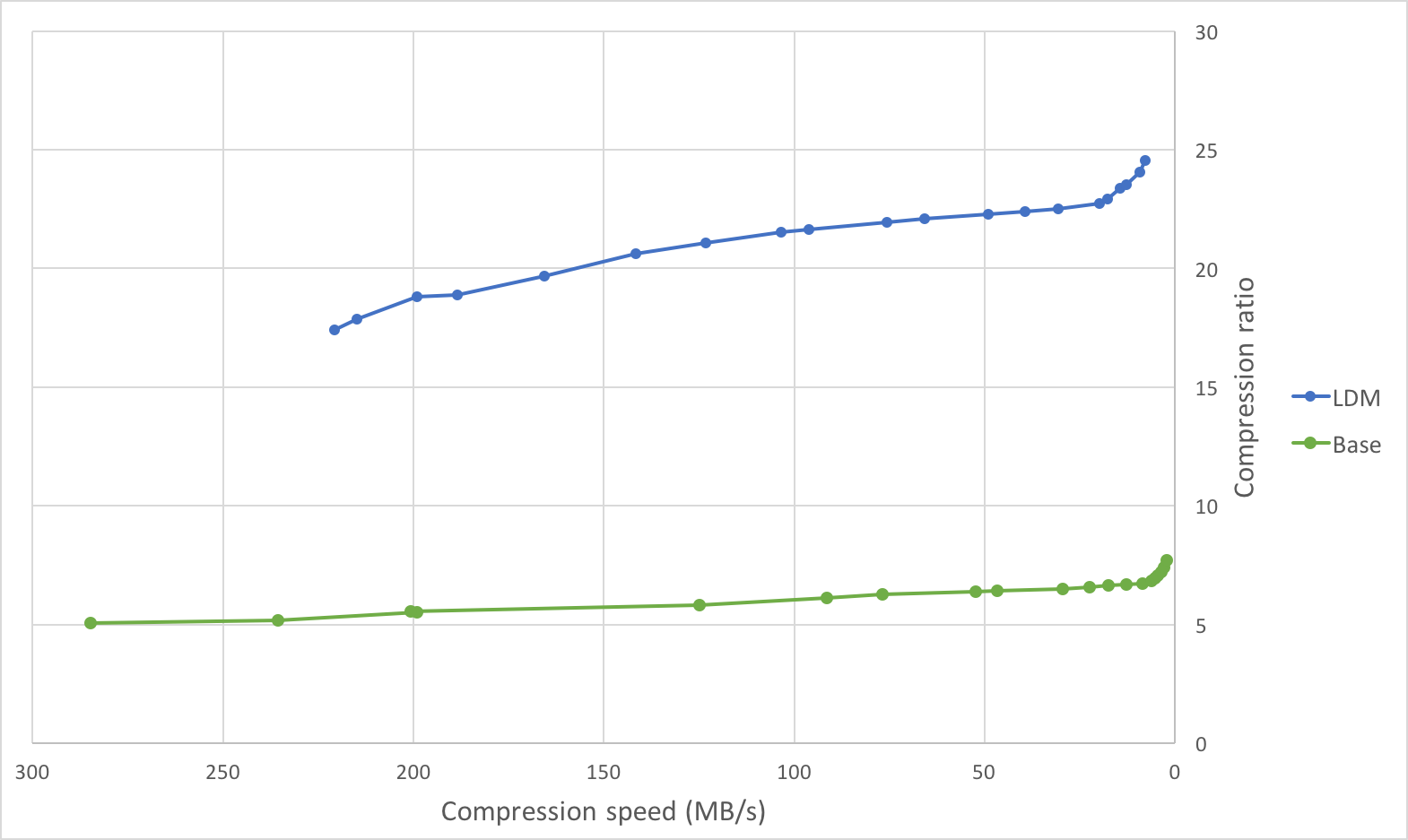
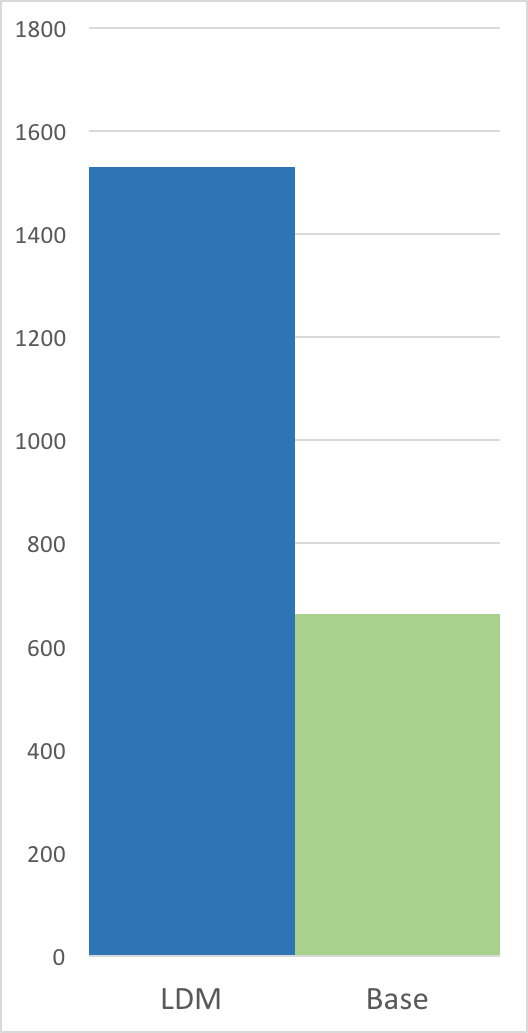
| Below are graphs comparing the compression speed, compression ratio, and |
| decompression speed with and without long distance matching on an ideal use |
| case: a tar of four versions of clang (versions `3.4.1`, `3.4.2`, `3.5.0`, |
| `3.5.1`) with a total size of `244889600 B`. This is an ideal use case as there |
| are many long distance matches within the maximum window size of `128 MiB` (each |
| version is less than `128 MiB`). |
| |
| Compression Speed vs Ratio | Decompression Speed |
| ---------------------------|--------------------- |
|  |  |
| |
| | Method | Compression ratio | Compression speed | Decompression speed | |
| |:-------|------------------:|-------------------------:|---------------------------:| |
| | `zstd -1` | `5.065` | `284.8 MB/s` | `759.3 MB/s` | |
| | `zstd -5` | `5.826` | `124.9 MB/s` | `674.0 MB/s` | |
| | `zstd -10` | `6.504` | `29.5 MB/s` | `771.3 MB/s` | |
| | `zstd -1 --long` | `17.426` | `220.6 MB/s` | `1638.4 MB/s` | |
| | `zstd -5 --long` | `19.661` | `165.5 MB/s` | `1530.6 MB/s` | |
| | `zstd -10 --long`| `21.949` | `75.6 MB/s` | `1632.6 MB/s` | |
| |
| On this file, the compression ratio improves significantly with minimal impact |
| on compression speed, and the decompression speed doubles. |
| |
| On the other extreme, compressing a file with few long distance matches (such as |
| the [Silesia compression corpus]) will likely lead to a deterioration in |
| compression speed (for lower levels) with minimal change in compression ratio. |
| |
| The below table illustrates this on the [Silesia compression corpus]. |
| |
| [Silesia compression corpus]: https://sun.aei.polsl.pl//~sdeor/index.php?page=silesia |
| |
| | Method | Compression ratio | Compression speed | Decompression speed | |
| |:-------|------------------:|------------------:|---------------------:| |
| | `zstd -1` | `2.878` | `231.7 MB/s` | `594.4 MB/s` | |
| | `zstd -1 --long` | `2.929` | `106.5 MB/s` | `517.9 MB/s` | |
| | `zstd -5` | `3.274` | `77.1 MB/s` | `464.2 MB/s` | |
| | `zstd -5 --long` | `3.319` | `51.7 MB/s` | `371.9 MB/s` | |
| | `zstd -10` | `3.523` | `16.4 MB/s` | `489.2 MB/s` | |
| | `zstd -10 --long`| `3.566` | `16.2 MB/s` | `415.7 MB/s` | |
| |
| |
| ### zstdgrep |
| |
| `zstdgrep` is a utility which makes it possible to `grep` directly a `.zst` compressed file. |
| It's used the same way as normal `grep`, for example : |
| `zstdgrep pattern file.zst` |
| |
| `zstdgrep` is _not_ compatible with dictionary compression. |
| |
| To search into a file compressed with a dictionary, |
| it's necessary to decompress it using `zstd` or `zstdcat`, |
| and then pipe the result to `grep`. For example : |
| `zstdcat -D dictionary -qc -- file.zst | grep pattern` |
