

| # Android Platform Embedder | |
| Android embedder for Flutter, including Java [`io.flutter`](io/flutter/) sources | |
| and Android specific engine-side C++. | |
| This code provides the glue between the Flutter engine and the Android platform, | |
| and is responsible for: | |
| - Initializing the Flutter engine. | |
| - Providing a platform view for the Flutter engine to render into. | |
| - Dispatching events to the Flutter engine. | |
| > [!CAUTION] | |
| > This is a best effort attempt to document the Android embedder. It is not | |
| > guaranteed to be up to date or complete. If you find a discrepancy, please | |
| > [send a pull request](https://github.com/flutter/engine/compare)! | |
| See also: | |
| - [`../../tools/android_lint/bin/main.dart`](../../../tools/android_lint/bin/main.dart) | |
| - [Android Platform Views](https://github.com/flutter/flutter/wiki/Android-Platform-Views) | |
| - [Hosting native Android views in your Flutter app with Platform Views](https://docs.flutter.dev/platform-integration/android/platform-views) | |
| - [Testing Android Changes in the Devicelab on an Emulator](https://github.com/flutter/flutter/wiki/Testing-Android-Changes-in-the-Devicelab-on-an-Emulator) | |
| - [Texture Layer Hybrid Composition](https://github.com/flutter/flutter/wiki/Texture-Layer-Hybrid-Composition) | |
| ## Developing | |
| How to edit and contribute to the Android embedder. | |
| > ![TIP] | |
| > This guide assumes you already have a working Engine development environment: | |
| > | |
| > - [Setting up the Engine development environment](https://github.com/flutter/flutter/wiki/Setting-up-the-Engine-development-environment) | |
| > - [Compiling for Android](https://github.com/flutter/flutter/wiki/Compiling-the-engine#compiling-for-android-from-macos-or-linux) | |
| > | |
| > You should also have a working Android development environment: | |
| > | |
| > - [Android Studio](https://developer.android.com/studio) | |
| > - [Install Flutter > Test Drive](https://docs.flutter.dev/get-started/test-drive?tab=androidstudio) | |
| > | |
| > _It is also recommended (but not required) to install | |
| > [Visual Studio Code](https://code.visualstudio.com/)._ | |
| Depending on what you are trying to do, you may need to edit the Java code in | |
| [`io.flutter`](io/flutter/) or the C++ code in [`shell/platform/android`](./), | |
| sometimes both. Let's start with the C++ code, as it is more similar to | |
| developing for other platforms or platform-agnostic parts of the engine. | |
| ### Editing C++ code | |
| The C++ code for the Android embedder is located in | |
| [`shell/platform/android`](./) and subdirectories. | |
| Some notable files include: | |
| - [`context/android_context.h`](./context/android_context.h): Holds state that | |
| is shared across Android surfaces. | |
| - [`jni/platform_view_android_jni.h`](./jni/platform_view_android_jni.h): Allows | |
| calling Java code running in the JVM. | |
| - [`AndroidManifest.xml`](./AndroidManifest.xml): Used by [`android_lint`](../../../tools/android_lint/). | |
| - [`BUILD.gn`](./BUILD.gn): Used by GN to build the C++-side embedder tests and | |
| the `flutter.jar` file for the engine. | |
| - [`ndk_helpers.h`](./ndk_helpers.h): Helper functions for dynamically loading | |
| and calling Android NDK (C/C++) functions. | |
| - [`platform_view_android.h`](./platform_view_android.h): The main entry point | |
| for the Android embedder. | |
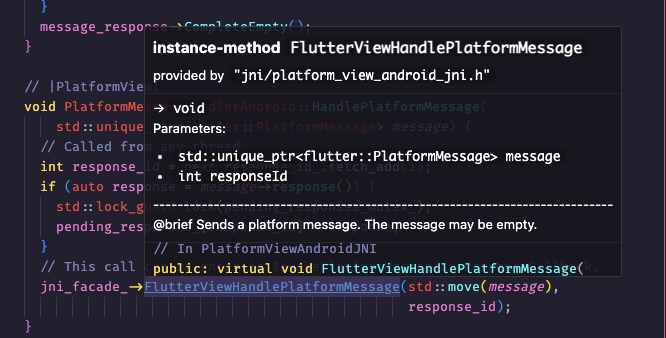
| See [VSCode with C/C++ Intellisense](https://github.com/flutter/flutter/wiki/Setting-up-the-Engine-development-environment#vscode-with-cc-intellisense-cc) | |
| for how to use the [`clangd`](https://marketplace.visualstudio.com/items?itemName=llvm-vs-code-extensions.vscode-clangd) extension to get C++ code | |
| completion: | |
|  | |
| > ![NOTE] > `--compile-commands-dir` must point to an Android build output: | |
| > | |
| > ```jsonc | |
| > { | |
| > /* ... */ | |
| > "clangd.path": "buildtools/mac-arm64/clang/bin/clangd", | |
| > "clangd.arguments": ["--compile-commands-dir=out/android_debug_unopt_arm64"] | |
| > /* ... */ | |
| > } | |
| > ``` | |
| > | |
| > ... but remember to change it back when editing other parts of the engine. | |
| ### Editing Java code | |
| The Java code for the Android embedder is located in | |
| [`io/flutter/`](io/flutter/) and subdirectories. | |
| The tests are located in [`test/io/flutter/`](test/io/flutter/), and the test | |
| runner in [`test_runner`](test_runner/). | |
| Some notable files include: | |
| - [`io/flutter/embedding/android/FlutterActivity.java`](io/flutter/embedding/android/FlutterActivity.java): | |
| An activity that displays a full-screen Flutter UI. | |
| - [`io/flutter/embedding/engine/FlutterJNI.java`](io/flutter/embedding/engine/FlutterJNI.java): | |
| The Java interface for the C++ engine. | |
| - [`io/flutter/view/TextureRegistry.java`](io/flutter/view/TextureRegistry.java): | |
| Registry of backend textures used by a Flutter View. | |
| It is non-trivial to get a working IDE setup for editing Java code in the | |
| Flutter engine. Some developers have had success [using VSCode as an IDE for the Android Embedding](https://github.com/flutter/flutter/wiki/Setting-up-the-Engine-development-environment#using-vscode-as-an-ide-for-the-android-embedding-java), | |
| but the following instructions are for if that doesn't work, or you want to use | |
| Android Studio: | |
| 1. Open `shell/platform/android` in Android Studio. | |
| 1. Configure the following: | |
| - [`Preferences | Build, Execution, Deployment | Gradle-Android Compiler`](jetbrains://AndroidStudio/settings?name=Build%2C+Execution%2C+Deployment--Gradle-Android+Compiler) | |
| Command-line Options: | |
| ```txt | |
| -Pbuild_dir="/tmp/build_dir" -Pflutter_jar="$ENGINE/src/out/android_debug_unopt_arm64/flutter.jar" | |
| ``` | |
| - [`Preferences | Build, Execution, Deployment | Build Tools | Gradle`](jetbrains://AndroidStudio/settings?name=Build%2C+Execution%2C+Deployment--Build+Tools--Gradle) | |
| Distribution of `Local Installation` with: | |
| ```txt | |
| $ENGINE/src/third_party/gradle | |
| ``` | |
| Gradle SDK using Android Studio (path depends on your machine): | |
| ```txt | |
| /Applications/Android Studio.app/Contents/jbr/Contents/Home | |
| ``` | |
| 1. Sync Gradle. | |
|  | |
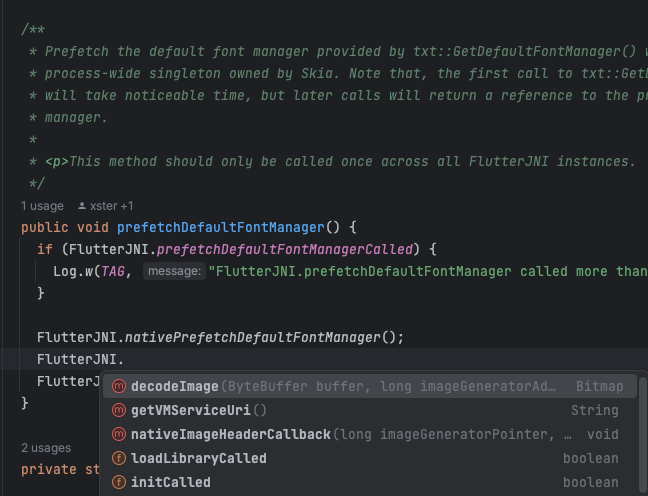
| At this point you should be able to open Java files in Android Studio and get | |
| code completion in the `io/flutter` folder (additional, undocumented work is | |
| required for `test/io/flutter`). For example, `FlutterJNI.java`: | |
|  |